
If you are getting an error when trying to send an email in AFrame, this article lists the most common reasons this is happening. Check these things in your email integration settings:
Email Integration Not Set Up
When an email won’t send or is sent from another team member’s address, it’s usually because the user hasn’t integrated their own email with their account. If a team member has their team access setting turned on, AFrame will automatically use the “next in line” email from the account to send the message. See the instructions below for integrating an email:
Integration Steps:
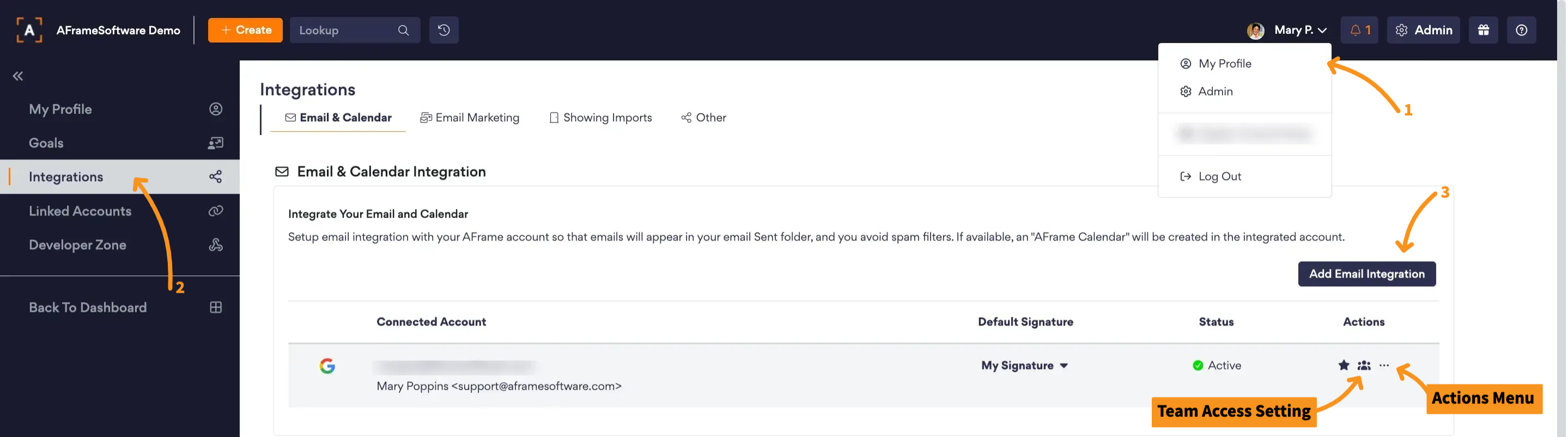
- Go to My Profile
- Go to the Integrations Page in the left navigation window
- Select Add Email Integration button
- Log in to your email account & authorize the AFrame connection
Note: Your email integration automatically creates an AFrame Feed on your email calendar that auto-updates with your assigned transaction and contact dates.
Email Needs Reauthorization
Sometimes email integrations can become unavailable. This can happen because the connection has been broken (e.g., you changed your email password or revoked AFrame access in some way), or in a rare instance, there was a temporary interruption in the email API. Follow the instructions below to reauthorize the AFrame connection:
Reauthorize Steps:
- Go to My Profile > Integrations > Email & Calendar Page (https://www.aframeonline.com/afs/app/IntegrationEmail.action). See image above.
- Click the actions menu (... icon) next to the integrated email
- Select Reauthorize Account
View in AFrame: My Profile > Integrations > Email & Calendar Page
Related Articles: Email Integration, AFrame Calendar Feed
Need help? We're here for you! Email us at Support@AFrameSoftware.com or use the ? icon in the top right of your AFrame account to submit a help request form.