
When using due date formulas in AFrame, you’ll need a static reference date—a specific date from the Dates tab, such as the Effective Date, Closing Date, or a Custom Template Date.
Knowing that, you will create 2 date placeholders:
1. One for the date you receive the document, which will be left blank until that date is known
2. One that calculates the due date based on the received date.
This setup ensures all contingency deadlines are triggered by the actual date of receipt, keeping your timelines accurate and automatically updated.
How To Setup:
Contingency Dates Based on Received Dates
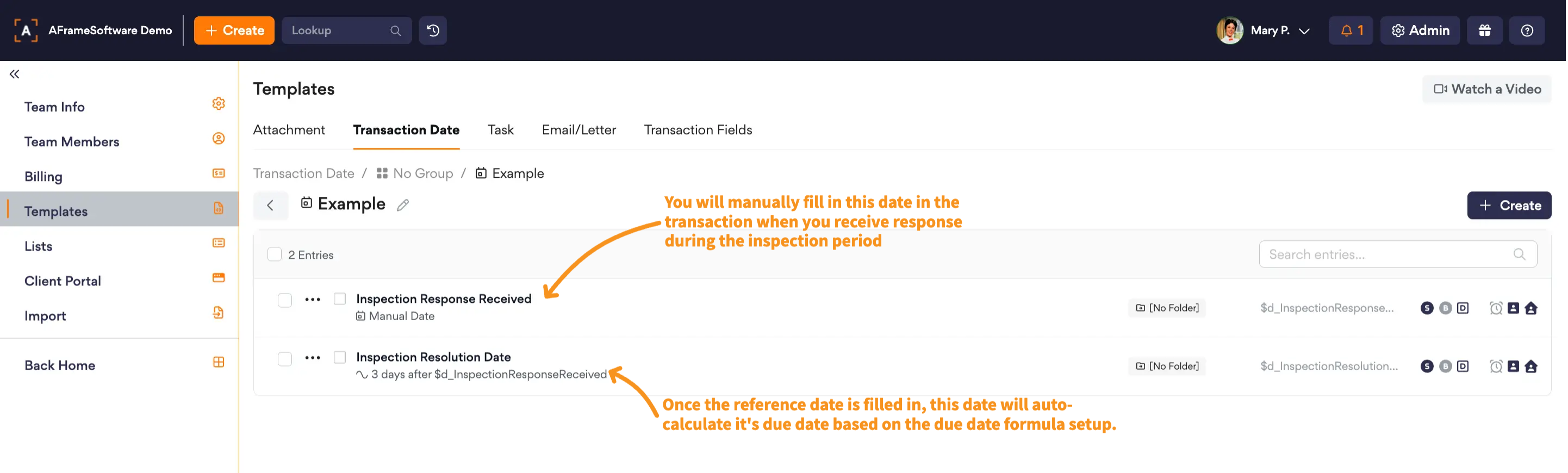
Create a “Received” date placeholder
Leave this date as a "Manual Date" in the template
This is entered manually in the date tab when the initial document or contingency (e.g., inspection request) is received.
Create a “Response” date placeholder
In the template, set the formula to calculate X days after the “Received” date placeholder that you created
Once the “Received” placeholder date is entered in the transaction, the contingency response date will auto-fill based on your formula.