
You have two choices for removing a user: deactivate or delete. We recommend that you deactivate users rather than delete them.
Deactivate: This will place the team member inactive without actually deleting them. This also saves all the data attributed to the user so that reports and statistics remain accurate. For standard users, this will remove them from your monthly billing.
Delete: This completely removes the team member profile from your account. You must assign everything to an "active" team member so that data will remain available and accessible in AFrame. This may have adverse effects when you want to run reports and statistics in the future, as it will reassign tasks, transactions, contact ownership, and item completion tracking to the selected profile. Instead, we recommend marking the user as "inactive" to keep the data accurate.
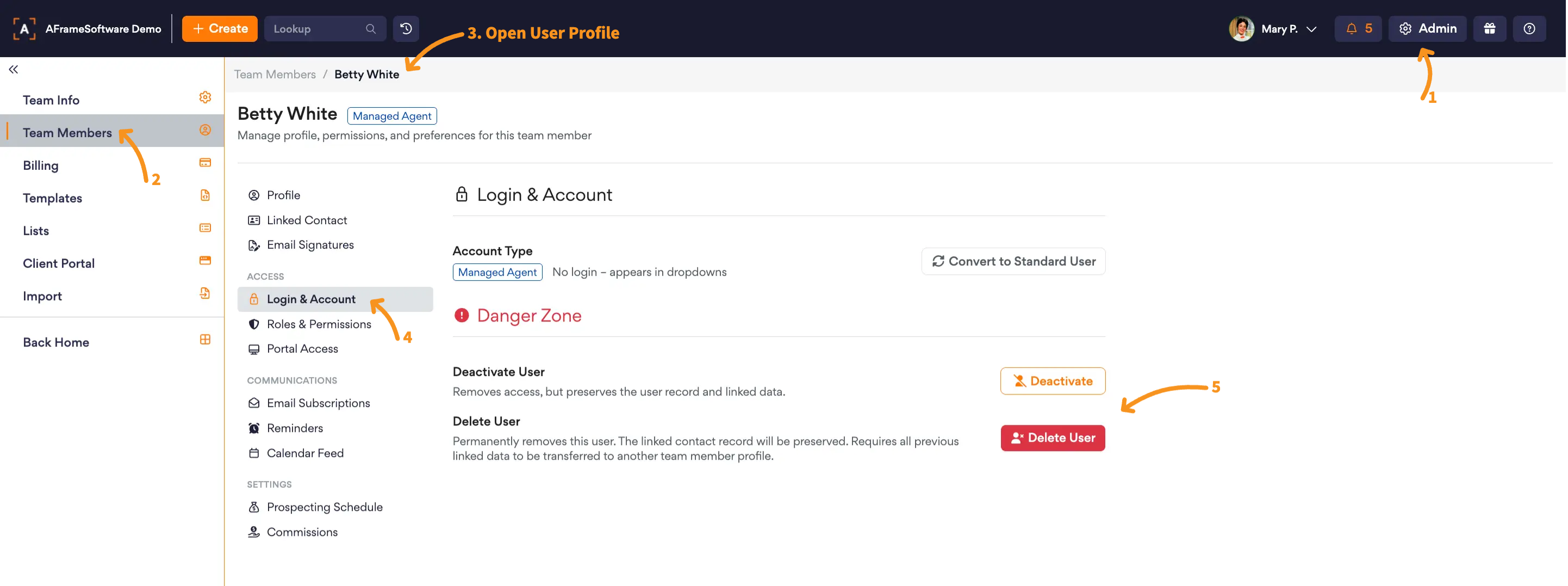
Open in AFrame: Admin → Team Members